Filing PIT-38 in Twój e-PIT — step by step
A practical guide to filing the PIT-38 form in the Twój e-PIT system (e-Urząd Skarbowy) — with screenshots of every step, field mapping, and tips for stock, ETF, and crypto investors in Poland.
Updated: April 2026 (tax year 2025)To file PIT-38 in Twój e-PIT, log in to e-Urząd Skarbowy, select the PIT-38 form, set the 19% tax rate, enter your revenue and costs in section C, add foreign dividends in section G (if applicable), attach PIT/ZG for foreign income, and submit by April 30.
Before you start — what to prepare
- 1Profil Zaufany (trusted profile), e-dowód, or the mObywatel app — for logging in to podatki.gov.pl. If you don't have a Profil Zaufany yet, setting one up takes 1–2 days.
- 2A ready summary from the calculator with your revenue, costs, and tax amounts. To fill PIT-38, you need exact numbers — our calculator generates them automatically after importing your broker files.
- 3PIT-8C from your Polish broker (if applicable). If you received a PIT-8C, e-PIT may have pre-filled some fields — add those values to the ones from the calculator.
- 4PIT/ZG summary with a country breakdown, if you traded through a foreign broker (e.g., Interactive Brokers, Degiro, Revolut).
- 5Last year's PIT-38, if you have losses to carry forward — you'll need the undeducted loss amount.
- 6The entire process takes about 15–20 minutes if your numbers are prepared. Without preparation — up to an hour.
Login and navigation
- 1
Log in to e-Urząd Skarbowy
Go to podatki.gov.pl and select Twój e-PIT. Log in using your Profil Zaufany, e-dowód, or data from last year's tax return (revenue amount from the previous PIT).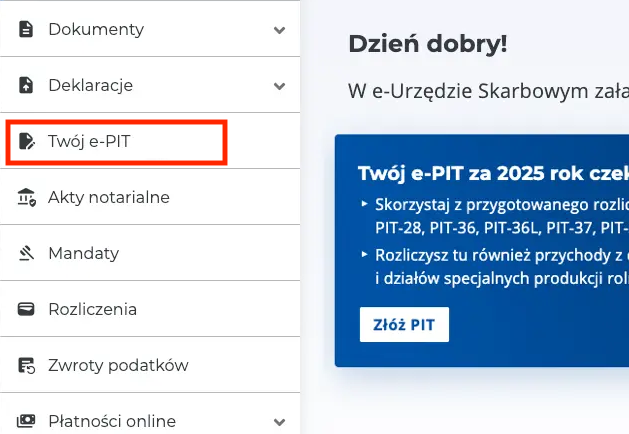
We recommend using a desktop computer — the e-Urząd interface can be inconvenient on mobile for complex forms.
- 2
Select Złóż PIT-38
On the Złóż PIT page, find the section Twój e-PIT-38 za rok 2025 and click the Złóż PIT-38 button. If the system displays a message about missing PIT-8C data — that's normal for foreign brokers. Click the button anyway.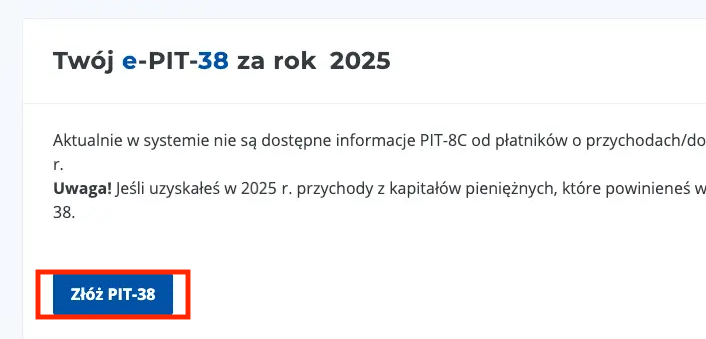
Filling the form
- 3
Set the securities tax rate (19%)
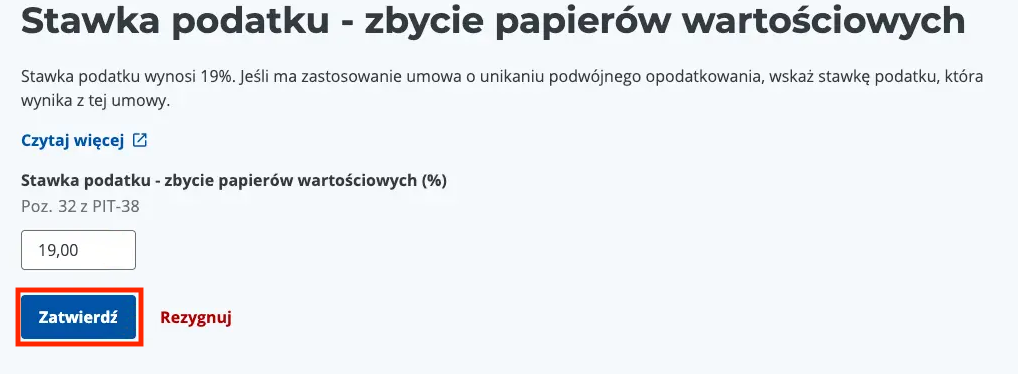
On the Twój e-PIT-38 summary screen, find the row Stawka podatku - zbycie papierów wartościowych (tax rate — securities). Click Edytuj (Edit), enter 19, and click Zatwierdź (Confirm).
- 4
Set the cryptocurrency tax rate (19%)
Not applicable? If you did not trade any cryptocurrencies in 2025, you can skip this step — go to step 5.
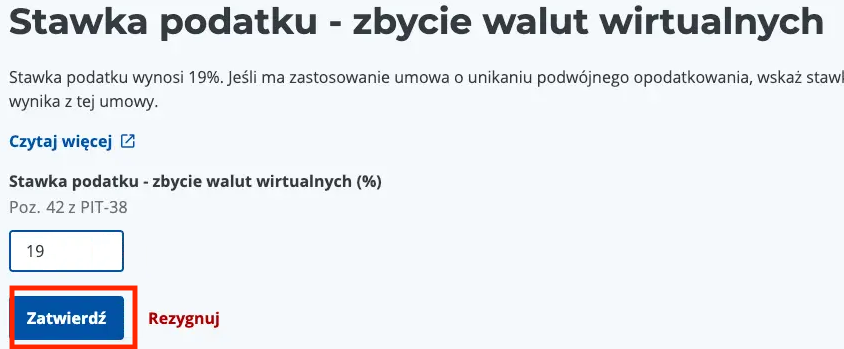
In the same summary, find the row Stawka podatku - zbycie walut wirtualnych (tax rate — virtual currencies). Click Edytuj, enter 19, and click Zatwierdź.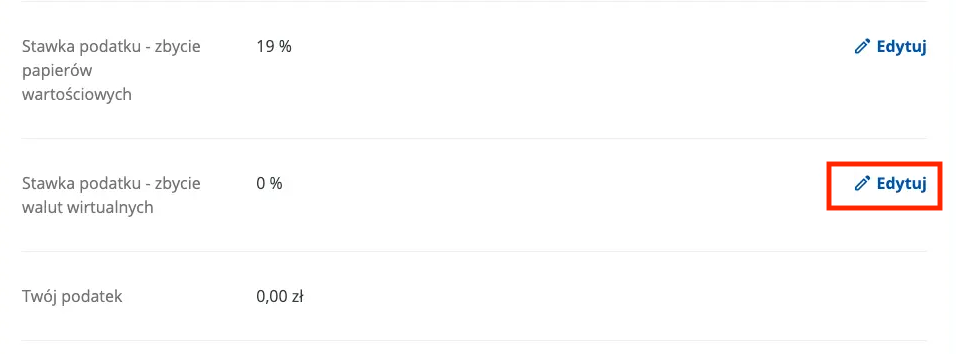
- 5
Add revenue and costs
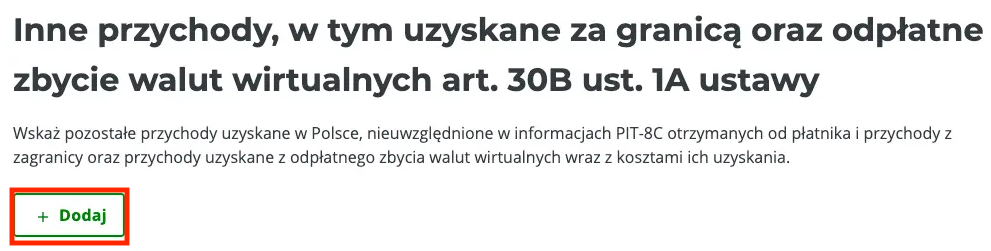
In the Dochód (Income) section, click + Dodaj (Add). On the next screen, under Inne przychody, w tym uzyskane za granicą oraz odpłatne zbycie walut wirtualnych art. 30B ust. 1A ustawy, click + Dodaj again.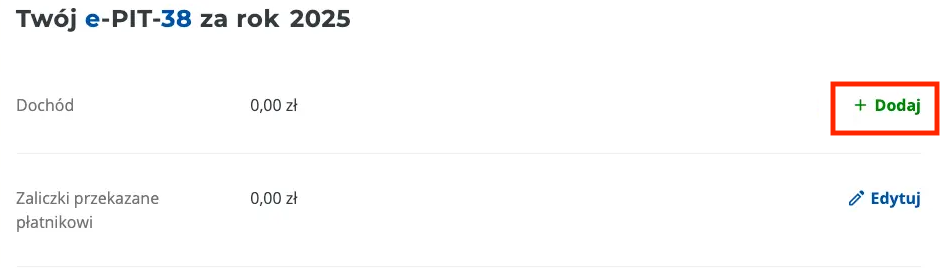
- 6
Fill in revenue and cost fields
Copy values from your calculator summary (the PIT-38 Summary section) into the corresponding form fields.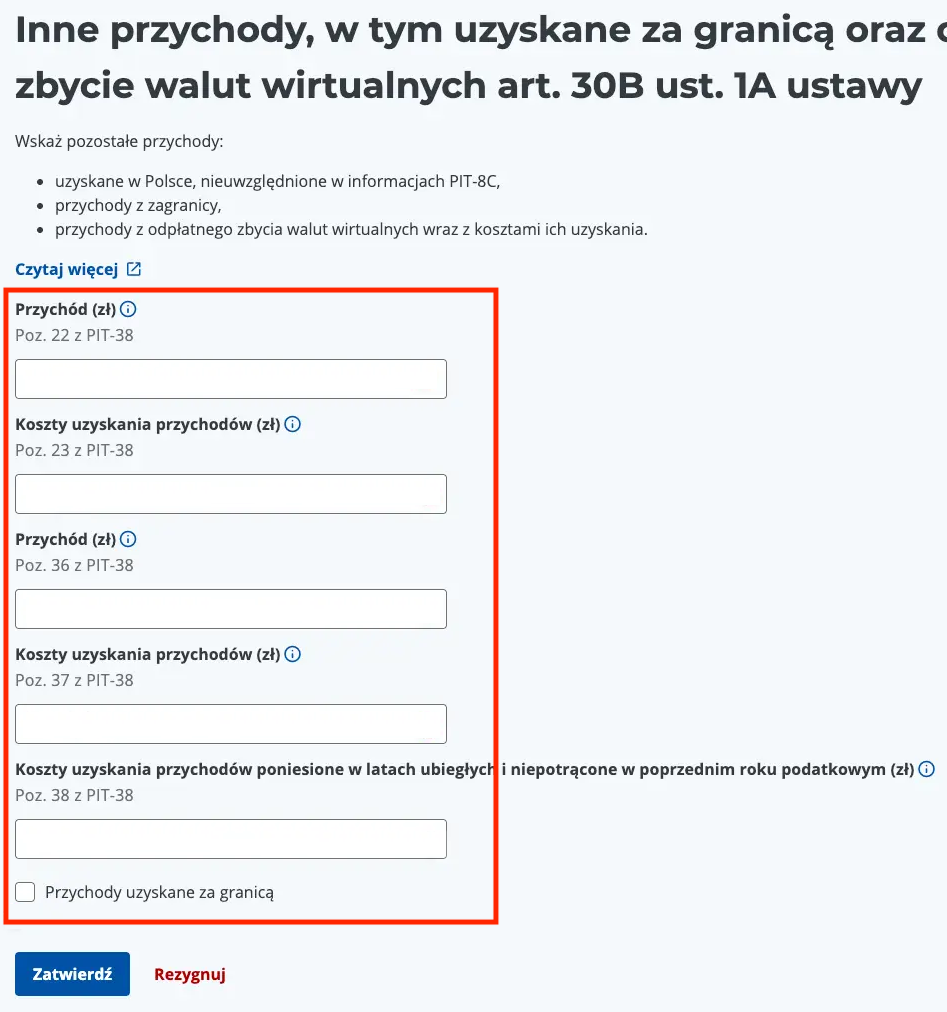
Pozycja PIT-38 Opis pola Źródło danych Poz. 22 (PIT-38) C.22 Revenue Revenue from selling securities — total proceeds from stocks, ETFs, and other instruments Poz. 23 (PIT-38) C.23 Costs Acquisition costs — purchase costs (FIFO) + commissions Poz. 36 (PIT-38) E.36 Crypto revenue Revenue from selling virtual currencies Poz. 37 (PIT-38) E.37 Crypto costs Acquisition costs incurred in the current tax year Poz. 38 (PIT-38) E.38 Prior-year costs Costs incurred in previous years and not yet deducted If the calculator shows a PIT/ZG section with a list of countries, check the Przychody uzyskane za granicą (foreign income) checkbox at the bottom. Don't check it if all your trades were through a Polish broker.
- 7
Fill the PIT/ZG attachment (foreign income)
Not applicable? If all your transactions were through a Polish broker (e.g., XTB, mBank eMakler) — skip this step.
After checking the foreign income checkbox, the PIT/ZG form opens. For each country where you earned income (not a loss), fill in the relevant fields. Check the income type: Inne przychody, w tym uzyskane za granicą (for stocks/ETFs) and/or Odpłatne zbycie walut wirtualnych (for crypto). Then fill in: Poz. 6 (country), Poz. 29 (foreign stock/ETF income), and Poz. 31 (foreign crypto income). Leave tax fields (Poz. 30 and 32) at 0.00 PLN — brokers don't withhold capital gains tax. For multiple countries, click + Dodaj dochód and repeat. Click Zatwierdź when done.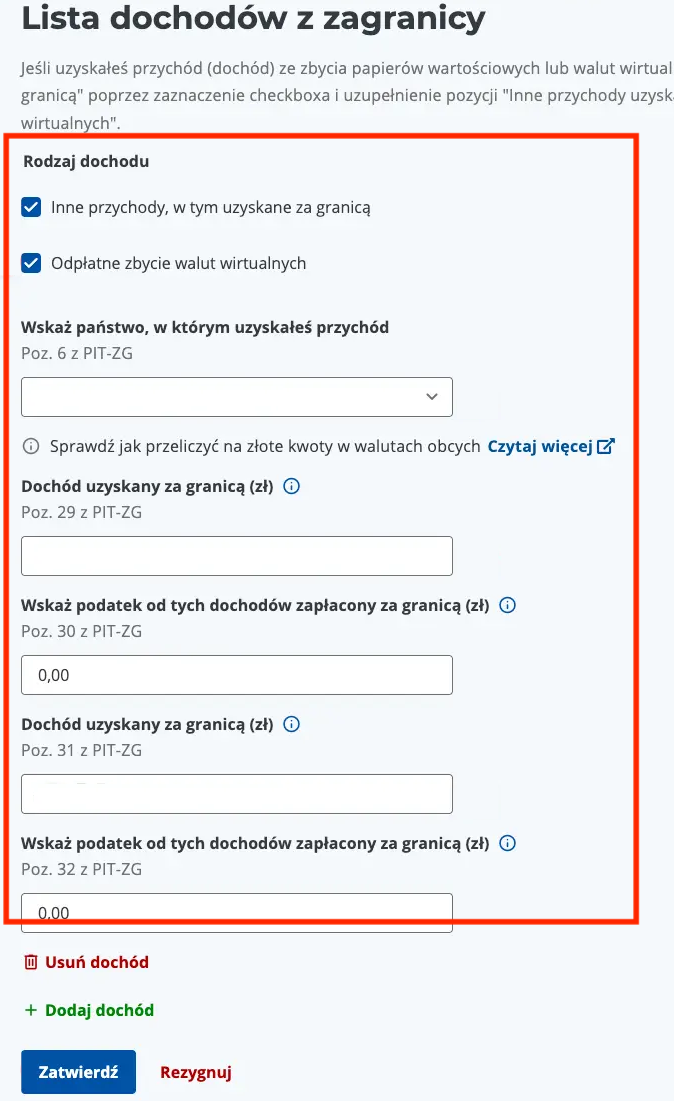
The calculator indicates which countries require a PIT/ZG entry and which to skip (e.g., loss-only countries). Copy values from the Poz. 6, Poz. 29, and Poz. 31 columns in the calculator's PIT/ZG summary.
- 8
Add foreign dividend tax (Poz. 47–48)
Not applicable? If you did not receive any foreign dividends in 2025 — skip this step and proceed to step 9.
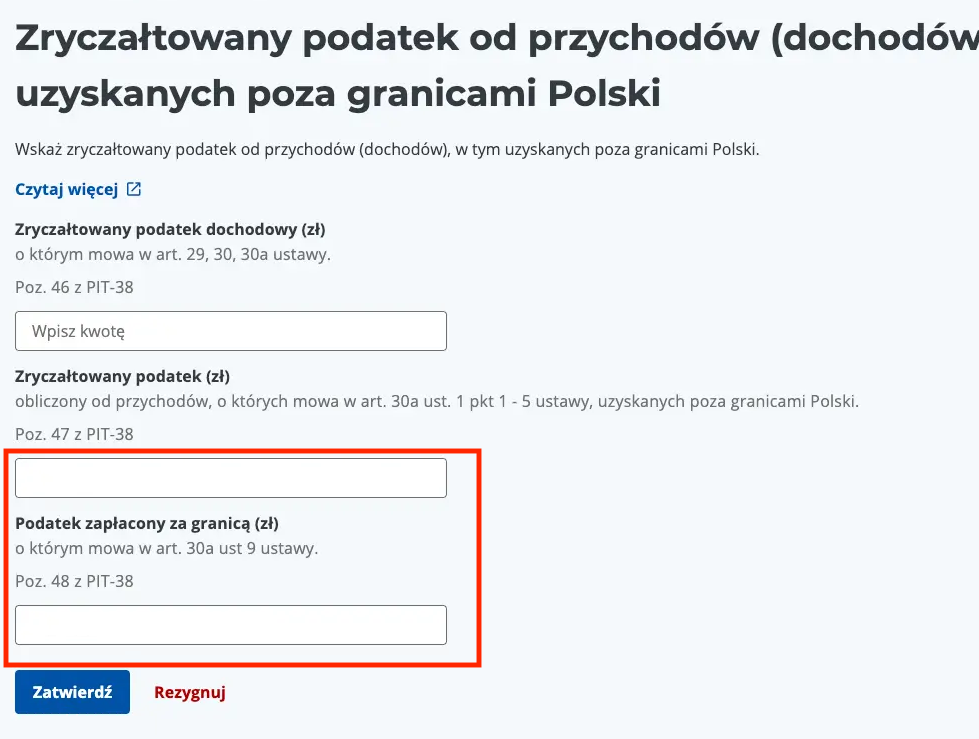
Return to the main income screen. Find the section Zryczałtowany podatek od przychodów (dochodów), w tym uzyskanych poza granicami Polski and click + Dodaj. Fill two fields: Poz. 47 — calculated tax on foreign dividends (from your calculator, row G.47) and Poz. 48 — foreign tax paid on dividends, converted to PLN (row G.48). Click Zatwierdź.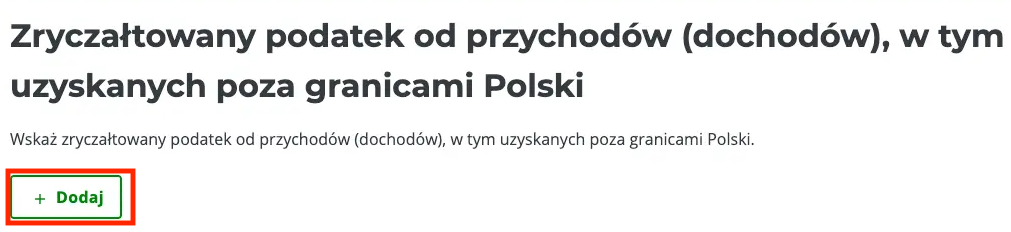
- 9
Deduct prior-year losses
Not applicable? If you have no losses from previous tax years — skip this step.
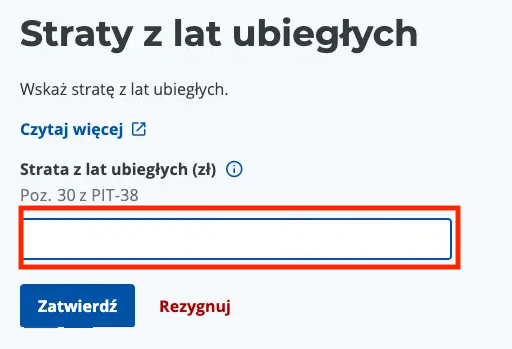
Find the Straty z lat ubiegłych (prior-year losses) section and click + Dodaj. Enter the loss amount to deduct this year. Losses can be deducted over 5 consecutive years — up to 50% per year, or a one-time deduction of up to 5,000,000 PLN (remainder in subsequent years, still max 50%/year). The deduction cannot exceed the income shown in the form. Click Zatwierdź.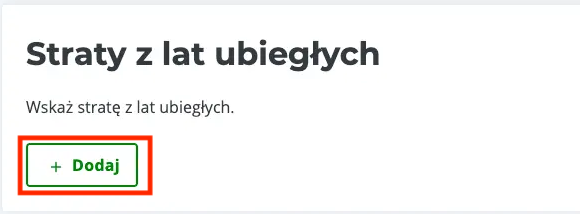
Review and submission
- 10
Return to the summary
Scroll to the top of the page and click the Powrót (Return) button. The system will display the PIT-38 summary with the calculated tax amount. - 11
Verify and submit the return
Check that the tax amount matches your calculator summary. If everything is correct, click Akceptuj i wyślij (Accept and submit). The return will be signed with your trusted profile and sent to the tax office. You can also click Podgląd (Preview) to see the full form before sending, or Zapisz zmiany (Save changes) to return later.You will receive an Urzędowe Poświadczenie Odbioru (UPO) — save it as proof of filing. If you discover an error after submission, you can file a correction through the same system until April 30.
After filing
After sending PIT-38 you will receive an Urzędowe Poświadczenie Odbioru (UPO) — save or print it as proof of timely filing. You can find the UPO in the Historia deklaracji section of e-Urząd Skarbowy. If the form shows tax due, transfer it to your individual tax micro-account (IRA) by April 30. Find your micro-account number at podatki.gov.pl under Sprawdz swój mikrorachunek. If you discover an error after filing — submit a correction through the same Twój e-PIT system. Go to Historia deklaracji, select your PIT-38, and click Złóż korektę. Before April 30 there are no penalties for corrections.
Mapping: calculator → PIT-38
The table below shows where to find each value for the PIT-38 form. If you use our calculator, these amounts appear in the PIT-38 Summary section after importing your transactions.
| Pozycja PIT-38 | Nazwa pola | Skąd wziąć wartość |
|---|---|---|
| C.22 | Przychód ze sprzedaży | Podsumowanie PIT-38 → Przychód |
| C.23 | Koszty uzyskania przychodu | Podsumowanie PIT-38 → Koszty (FIFO + prowizje) |
| E.36 | Przychód z kryptowalut | Podsumowanie PIT-38 → Przychód krypto |
| E.37 | Koszty krypto (bieżący rok) | Podsumowanie PIT-38 → Koszty krypto |
| E.38 | Koszty krypto (lata ubiegłe) | Podsumowanie PIT-38 → Koszty nieodliczone |
| G.47 | Podatek od dywidend zagranicznych | Podsumowanie PIT-38 → Podatek zryczałtowany G.47 |
| G.48 | WHT zapłacony za granicą | Podsumowanie PIT-38 → Podatek zagraniczny G.48 |
| PIT/ZG Poz. 6 | Kraj uzyskania dochodu | Zestawienie PIT/ZG → kolumna Kraj |
| PIT/ZG Poz. 29 | Dochód zagraniczny (akcje/ETF) | Zestawienie PIT/ZG → kolumna Poz. 29 |
| PIT/ZG Poz. 31 | Dochód zagraniczny (krypto) | Zestawienie PIT/ZG → kolumna Poz. 31 |
PIT-38 Form Fields — What to Enter and Where
Below is a reference table of the most important PIT-38 fields with descriptions. The calculator automatically fills all these fields based on your imported transactions.
| Field | Name | Description |
|---|---|---|
| C.20 | Revenue — row "From PIT-8C" | Auto-filled in e-PIT by the tax office based on PIT-8C from a Polish broker (XTB, mBank eMakler, PKO etc.) |
| C.21 | Costs — row "From PIT-8C" | Auto-filled in e-PIT. Purchase costs + brokerage commissions from PIT-8C. |
| C.22 | Revenue — row "Other income, including foreign" | This is where you enter amounts from foreign brokers (IBKR, Revolut, Degiro, Trading 212 etc.) from our calculator report |
| C.23 | Costs — row "Other income" | FIFO-matched purchase costs + commissions + margin loan interest (art. 22 ust. 1). From calculator report. |
| C.26 | Total Revenue | Sum of rows C.20 + C.22 + C.24. Calculated automatically |
| C.27 | Total Costs | Sum of rows C.21 + C.23 + C.25. Calculated automatically |
| C.28 | Income | C.26 minus C.27 (if positive). Calculated automatically |
| C.29 | Loss | If C.27 > C.26. Calculated automatically |
| D.30 | Losses from prior years | Only if you have a loss from the previous 5 years: once up to PLN 5 million, or at most 50% of the loss per year (art. 9 ust. 3); no more than C.28 |
| D.31 | Tax base | C.28 minus D.30, rounded to full PLN. Calculated automatically |
| D.32 | Tax rate | 19% (Art. 30b par. 1) |
| D.33 | Tax calculated | D.31 × 19%. Calculated automatically |
| D.34 | Foreign tax paid | Art. 30b par. 5a and 5b — from calculator report (for stocks usually 0) |
| D.35 | Tax due | D.33 minus D.34, rounded to full PLN. Calculated automatically |
| E.36 | Crypto revenue | From selling virtual currencies (Art. 30b par. 1a) |
| E.37 | Crypto costs — current year | Acquisition costs incurred in 2025 |
| E.38 | Crypto costs — prior years | Not deducted in previous year (Art. 22 par. 14-16) |
| E.40 | Crypto undeducted costs | Carried forward to following years |
| G.47 | Lump-sum tax on foreign dividends | 19% × total gross dividends (Art. 30a par. 1 pts 1-5). This is TAX, not dividend amount! |
| G.48 | Withholding tax paid abroad | Withheld abroad, credited at most up to the double tax treaty rate (art. 30a ust. 9), e.g. 15% for the USA, and no more than G.47 |
| G.49 | Difference (tax to pay in PL) | G.47 minus G.48, rounded to full PLN. Calculated automatically |
Common questions about filing PIT-38 in e-PIT
Can I file PIT-38 through the Twój e-PIT system?▾
What currency do I use when filling PIT-38?▾
I bought shares in 2024 and sold in 2025 — which PIT-38?▾
Do I have to report foreign dividends in PIT-38?▾
What if I make a mistake — can I file a correction?▾
Are cryptocurrencies reported in the same PIT-38?▾
I didn't file PIT-38 last year — what now?▾
Broker-specific guides
If you trade stocks or ETFs through a popular broker, start with a dedicated guide for import and tax filing.
PIT-38 Calculator
Use our calculator to generate a summary ready to copy into the form. Broker imports, FIFO, NBP rates.
Open PIT-38 calculatorDo 50 transakcji bezpłatnie • Bez karty płatniczej • Bez rejestracji
This guide is for informational purposes only and does not constitute tax advice. If in doubt, consult a qualified tax advisor (doradca podatkowy under the Polish Tax Advisory Act).